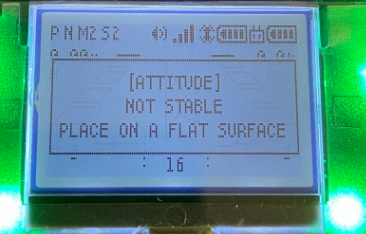
My CoDrone EDU controller screen says “attitude not stable, place on flat surface” when I try to take off.
 Updated
by
Robolink Support
Updated
by
Robolink Support

Holding down the top left shoulder button (L1) on the controller will send the takeoff command to CoDrone EDU. However, if your drone is having trouble taking off, you might see this message: "[Attitude] not stable - place on a flat surface”.
If the drone gets in this state, there are two ways you can try to return the drone to its normal flight state.
- Make sure your drone is flat on the ground
The gyroscope in your drone can sense when the drone is tilted or at an angle. If your drone is not flat on the ground with all of its feet on the floor, then the drone will not be able to takeoff.
- Reset the gyroscope on the drone
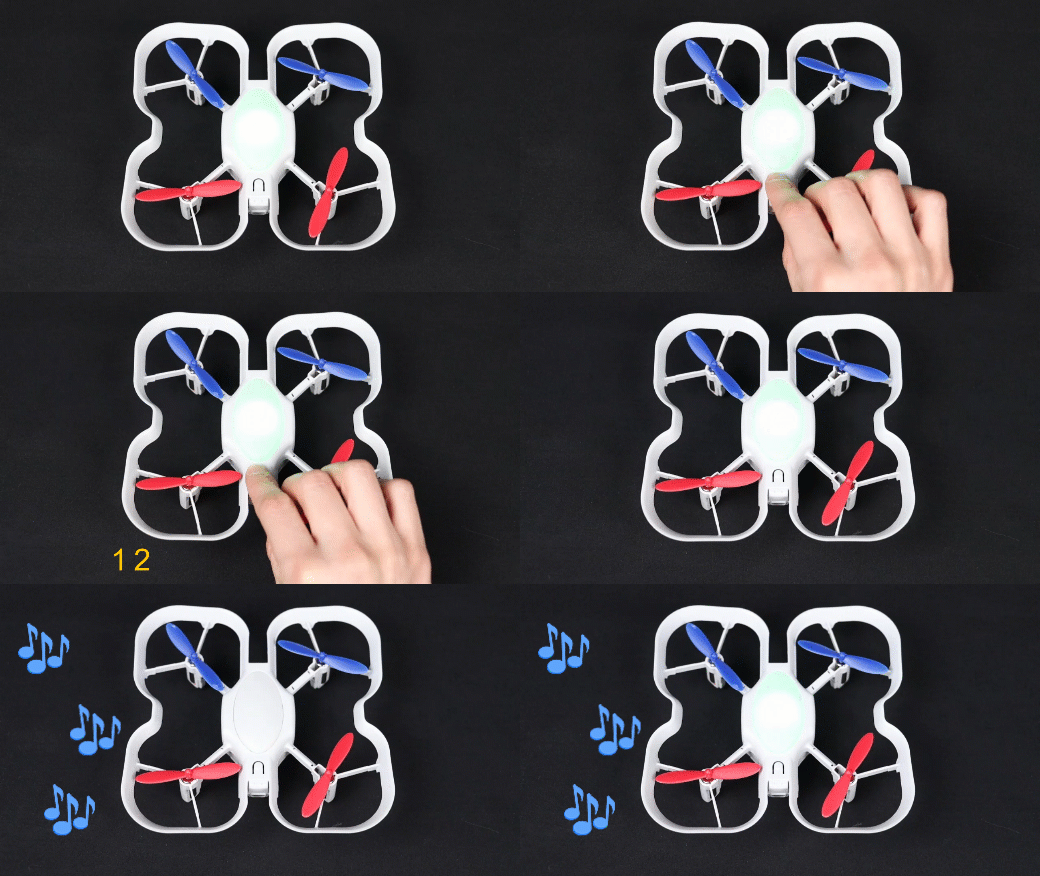
To reset your drone's gyroscope, locate the button on the top side of the drone. In rapid succession press the button 4 times. You will hear a sound sequence that indicates a successful calibration. Again, make sure the drone is on a flat surface. The floor works best.
- Test takeoff
If after calibration your drone now has the error "motion calibration" and will not takeoff, please review this article here and follow the steps: My CoDrone EDU controller screen says “motion calibrating” when I try to take off.
