How do I pair my CoDrone Pro in Arduino?
 Updated
by
Robolink Support
Updated
by
Robolink Support
The CoDrone Pro/Lite can be paired in Arduino using the pair() command found in the documentation library here. With the Arduino-based remote, pair() with no parameters will pair with the last paired CoDrone. If it's your first time using the remote, it will just find the nearest CoDrone it can find, then "lock in" with that CoDrone and always pair with it. The code below will print the CoDrone's address to the Arduino serial monitor (make sure that the baud rate on the bottom left of the serial monitor is 115200).
#include <CoDrone.h>

void setup() {

  CoDrone.begin(115200);              // sets up the connection to the drone using the bluetooth module at 115200bps (bits per second)
  CoDrone.pair();
  CoDrone.DroneModeChange(Flight);    // Changes the drone so that it is now in flight mode
}

void loop() {

  CoDrone.PrintDroneAddress();
}
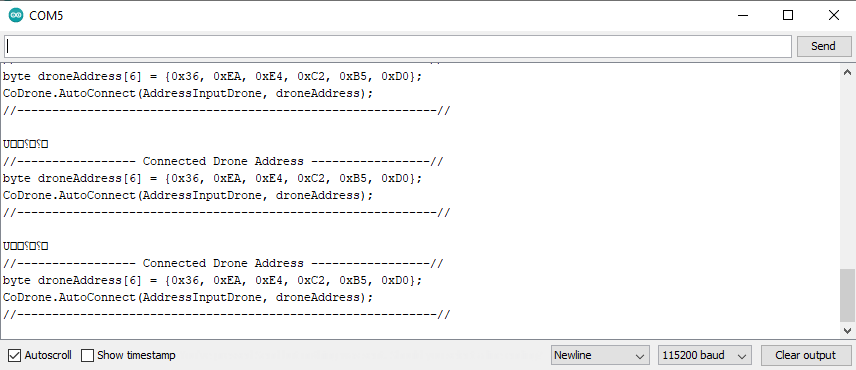
Once you have found the drone address, you can update the code above so that you will always pair to the same CoDrone each time you run your program.
#include <CoDrone.h>
void setup() {
    CoDrone.begin(115200);              // sets up the connection to the drone using the bluetooth module at 115200bps (bits per second)

    byte droneAddress[6] = {0x36, 0xEA, 0xE4, 0xC2, 0xB5, 0xD0}; //address from serial monitor - replace with your own drone address
    CoDrone.AutoConnect(AddressInputDrone, droneAddress);

    //CoDrone.pair(); //comment this line out so that your CoDrone does not try to pair to another remote and reset the whole pairing process
    CoDrone.DroneModeChange(Flight);    // Changes the drone so that it is now in flight mode
}
void loop() {
    CoDrone.PrintDroneAddress();
}
Watch this video to see how the code above is used in Arduino.