Why does my CoDrone EDU controller screen say “Motor Stalling”?
 Updated
by
Robolink Support
Updated
by
Robolink Support
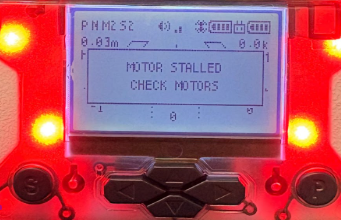
If your controller displays a “MOTOR STALLED” message, it means an electric motor is receiving power but cannot rotate due to excessive load then leading to a jammed mechanism that ultimately causes overheating and potentially burn out.
In all such cases, it is critical to emergency stop to avoid powering the motors if they cannot rotate freely.
This error typically appears in the following situations:
Repeated Takeoff Attempts With:
- Debris in the Motors and/or Propellers
- Debris such as hair, dust, or string may be caught in the motor or propeller.
- Gently flick the propeller and check whether it spins freely.
- If it does not spin freely, remove the propeller and inspect the motor shaft for debris.
- Carefully remove any debris found.
- Damaged Motors and/or Propellers
- Gently flick the propeller and check whether it spins freely.
- If there is no debris but the issue persists, the motor or propeller may be damaged.
- First, inspect the motor and propeller for visible physical damage. If no external damage is visible, the motor may have sustained internal damage. In either case, the motor will need to be replaced (please refer to the Robolink Help Article for replacement instructions).
- Damaged/detached motor port(s)
- Remove the bottom piece of the drone to check if the motor port is damaged/detached.
- In this case, this is not repairable and the drone can no longer fly.
In most cases, cleaning the motors and propellers—or, if necessary, replacing the affected motor—will resolve the issue.
What happens if the damage is severe?
If the “MOTOR STALLED” error still appears after following the previous troubleshooting steps, the drone may have sustained internal damage, which means the drone is no longer be repairable.
How can I prevent this from happening? (Robolink Help Article)
Here are a few useful practices you can follow that will further improve your CoDrone EDU experience:
- Complete a Pre-Flight Checklist Before Every Flight
- Always inspect your drone before takeoff.
- Ensure that no hair, dust, string, or debris is caught underneath the propellers.
- Obstructions can prevent proper motor rotation (eg. cracked frame or any modification to the frame such as attachments)
- Check the Silicone Bumpers
- Confirm that the silicone bumpers are intact before each flight.
- These bumpers help protect the motors during landing, especially in the case of abrupt or hard landings.
- Replace them regularly to maintain proper protection.
- Address Warnings Immediately
- Do not ignore propeller or motor warnings.
- Investigating and resolving the issue early can prevent more serious damage
- Failure to prevent motor stalls can result in destruction of the drone circuit board.
Contact Support if Needed
If you are not confident in replacing a motor or diagnosing the issue, please contact support@robolink.com for guidance before attempting further flights
