My CoDrone Pro controller joysticks are not working! How can I test them?
 Updated
by
Leila Firestone
Updated
by
Leila Firestone
If you have built your remote control but your CoDrone Pro/Lite will not fly, this article will help you test that your joysticks are wired up correctly and working properly.
The first step is to verify that you have connected the wires in the right order and orientation. If you are looking at your remote top-down, you should have connected the joysticks to the analog port starting from the left joystick and first analog, respectively. Here is a video that reviews the build. All of the cables should have the yellow serial wire on the left. Not connecting the wires in the correct way might damage your remote!
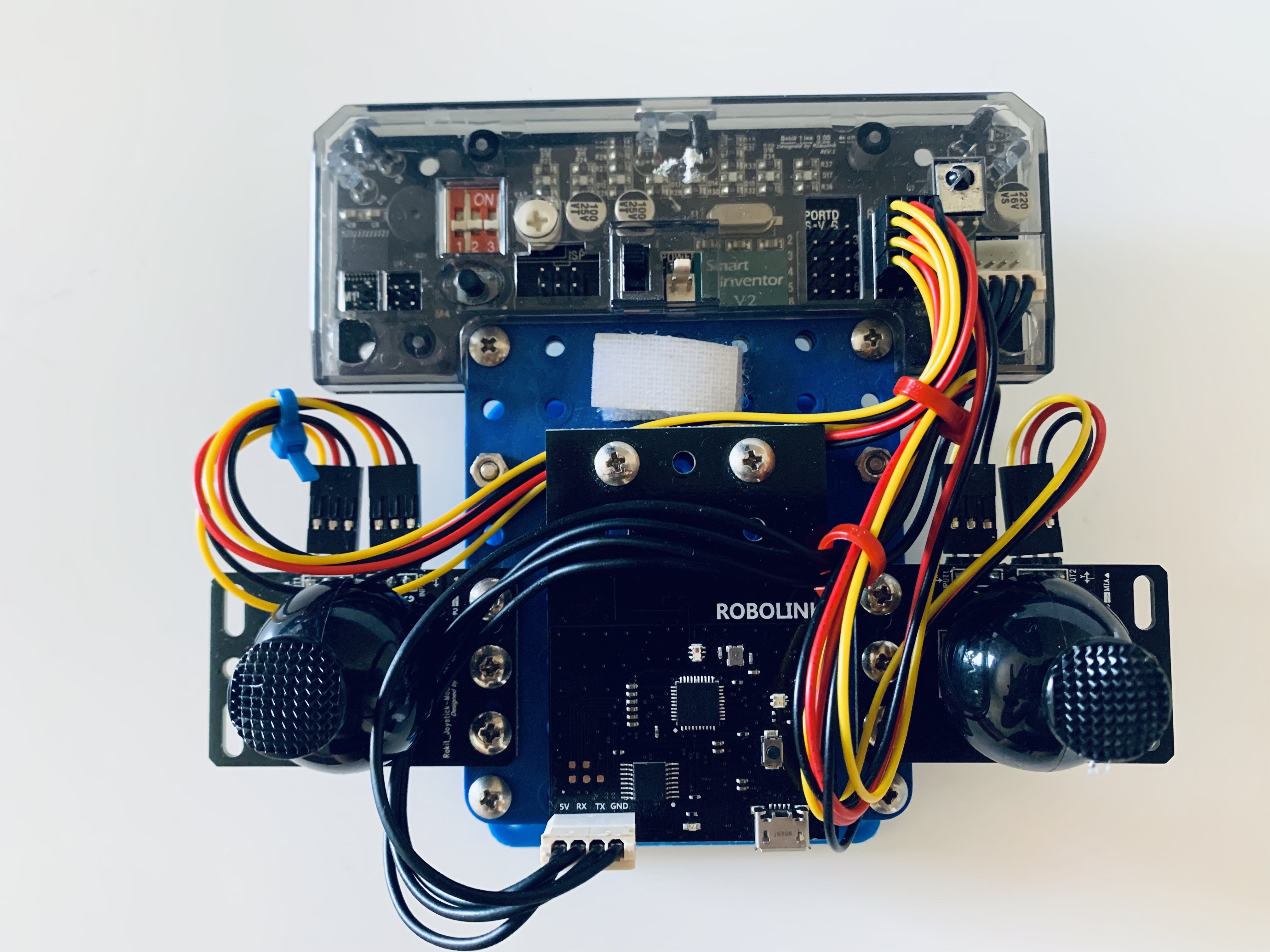
Once you have verified all the wires are in the correct order but your drone still won't fly, here is a test script you can run in Arduino to see if your joysticks are functioning. Note: To run the test script you need to have Arduino, the driver, board files, and library installed. Copy and paste the code below into Arduino, upload the code to your board (How to upload code), and run. Do not disconnect your remote from the computer.
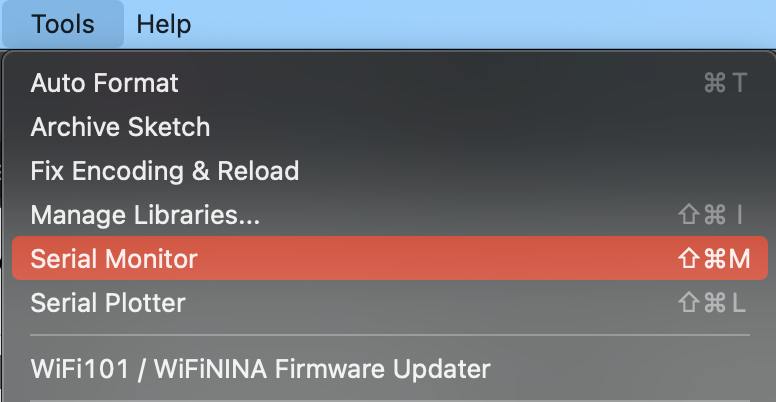
You will need to open the serial monitor and set the baud rate using the dropdown menu to 115200. The values of the joysticks should change if you move the joystick around. If the values are stuck at 0 or 1023, please reach out to us for replacement parts.
Code:
/*------------------------------------------------------------------
Remote sensor test
Objective   : Displays all sensor readings from inputs of the CoDrone pro remote
syntax      :
description : Displays the bottom IR readings, the 3 analog ir sensors and the 4 joystick readings
to use this open the serial monitor and set baud rate to 115200
-------------------------------------------------------------------*/
void setup()
{
  Serial.begin(115200);
  pinMode(11,INPUT);
  pinMode(12,INPUT);
  pinMode(13,INPUT);
  pinMode(14,INPUT);
  pinMode(16,INPUT);
  pinMode(17,INPUT);
  pinMode(18,INPUT);
}

void loop()
{
  //grab buttons' data
  byte bt1 = digitalRead(11);
  byte bt2 = digitalRead(12);
  byte bt3 = digitalRead(13);
  byte bt4 = digitalRead(14);
  byte bt6 = digitalRead(16);
  byte bt7 = digitalRead(17);
  byte bt8 = digitalRead(18);

  //Display all 7 "IR" bottom buttons
  //note: reading pin 14 and 15 would be the same
  Serial.print(bt1);
  Serial.print(" , ");
  Serial.print(bt2);
  Serial.print(" , ");
  Serial.print(bt3);
  Serial.print(" , ");
  Serial.print(bt4);
  Serial.print(" , ");
  Serial.print(bt6);
  Serial.print(" , ");
  Serial.print(bt7);
  Serial.print(" , ");
  Serial.print(bt8);
  Serial.print(" , ");

  // Display the Joystick values
  // A joystick thats works should be
  // around ~1023/2 = 511 plus or minus 20 when in centered position
  Serial.print(analogRead(A3));
  Serial.print(" , ");
  Serial.print(analogRead(A4));
  Serial.print(" , ");
  Serial.print(analogRead(A5));
  Serial.print(" , ");
  Serial.print(analogRead(A6));
  Serial.print(" , ");

  // Display the 3 front IR sensor readings
  Serial.print(analogRead(A0));
  Serial.print(" , ");
  Serial.print(analogRead(A1));
  Serial.print(" , ");
  Serial.print(analogRead(A2));
  Serial.println("");
}