How do I get the 4-digit CoDrone Pro/Lite address?
 Updated
by
Leila Firestone
Updated
by
Leila Firestone
The 4-digit CoDrone Pro/Lite address can be found through the pairing process for Blockly, Python, or Arduino.
Blockly:
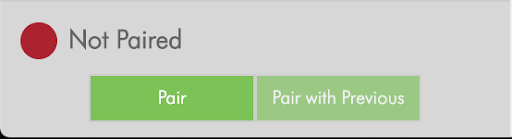
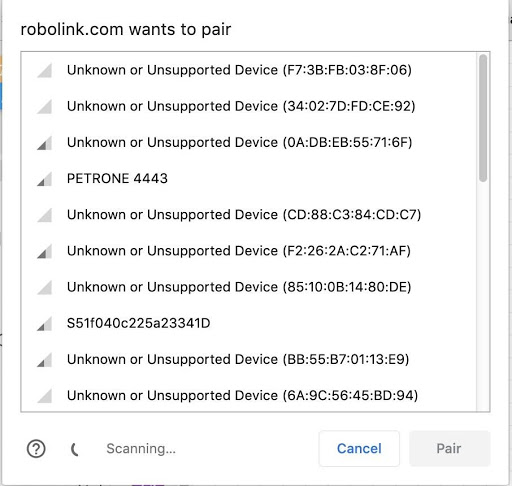
Connect to your CoDrone by clicking on the green connect button in the bottom lefthand corner. A list of devices should come up. Select the one that says “Petrone (# on the underside of your drone)”.
Python:
The CoDrone Pro/Lite can be paired in Python using the pair() command found in the documentation library here. With Python, pair() with no parameters will pair with the last paired CoDrone, which is saved in a file called "PairInfo." If it's your first time running pair(), it will just find the nearest CoDrone it can find, then "lock in" with that CoDrone, save it to "PairInfo" and always pair with it until you run pair(drone.Nearest). The CoDrone Pro/Lite's 4-digit address can be found in the PairInfo file after it has paired successfully for the first time.
Example Code
Python
#Python code
import CoDrone
def main():
    drone = CoDrone.CoDrone()
    drone.pair()
    # drone.pair(“5349”)
    # drone.pair(drone.Nearest)
    # you can set specific port name for pairing especially Windows need/require this
    # drone.pair(port_name = 'COM3')
    # drone.pair('1234', 'COM3')
    # drone.pair(drone.Nearest, 'COM3')
    drone.takeoff()
    drone.hover(3)
    drone.land()
    drone.close()
if __name__ == '__main__': main()
Arduino:
The CoDrone Pro/Lite can be paired in Arduino using the pair() command found in the documentation library here. With the Arduino-based remote, pair() with no parameters will pair with the last paired CoDrone. If it's your first time using the remote, it will just find the nearest CoDrone it can find, then "lock in" with that CoDrone and always pair with it.
Example
Arduino
#include <CoDrone.h>

void setup() {

  CoDrone.begin(115200);              // sets up the connection to the drone using the bluetooth module at 115200bps (bits per second)
  CoDrone.pair();
  CoDrone.DroneModeChange(Flight);    // Changes the drone so that it is now in flight mode
}

void loop() {

  CoDrone.PrintDroneAddress();
}